
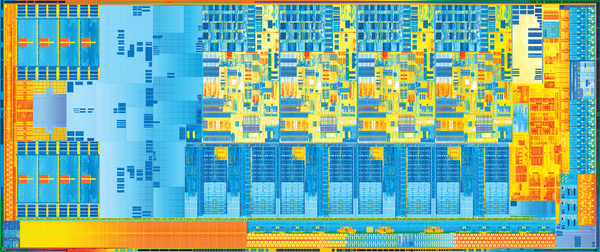
Intel processors are designed for notebook grade will enter a new phase with the launch of the Intel Core i 3 rd generation code-named Ivy Bridge using 22 nm fabrication. After nearly two years, naming Intel core i will soon go into 3 rd generation. 1 st generation of Intel core processor codenamed Arrandale i have that last for one year. Later, his throne was replaced 2 nd Generation code-named Sandy Bridge which is found in many notebooks today.
For the future, you will begin to get a notebook that uses Intel Ivy Bridge. I tell very easily. Sandy Bridge uses names with the prefix 2xxx series, while the Ivy bridge using the prefix 3xxx. For more details, you can read about the architecture of Intel Ivy Bridge in article Behind the Latest Technology Intel Ivy Bridge . One week prior to today (Tuesday, Ivy Bridge NDA expiry date), we get a shipment of two notebooks that have been equipped with an Intel i7 3610M Ivy Bridge.
The first notebook gaming notebook that carries the class specifications and features beyond the limits of reasonableness. How not? In addition to the latest Intel processors Ivy Bridge, this notebook carrying capacity of 60 GB mSATA x 2 units in-Raid-0 + 750 GB Hard disk, memory chip SODIMM 4 x 4 GB (which means a total of 16 GB), and an NVIDIA GeForce graphics GTX670M Optimus! This notebook is also equipped with a screen of 15.4 "with resolution of Full HD1080P, Optical drive Blu-ray, 3 USB3.0 ports, eSATA, sound from Dynaudio, and Turbo mode that will overclock the processor when you need high performance. Specifications dinotebook monster monster? How do you think?
The second notebook is a notebook-class entertainment that uses the Intel i7 3610M Ivy bridge, 6 GB DDR3 SODIMM memory, 750 GB hard disk, and graphics NVIDIA GeForce GTX560M Optimus. In addition to these specifications, the notebook comes with a 15 "Full HD1080P resolution, Optical drive Blu-ray, 4 USB3.0 ports, and the sound system from Bang & Olufsen.
Specifications Notebook
Sandy Bridge + Notebook Hard disk Ivy Bridge + SSD Notebook Ivy Bridge + Notebook Hard disk
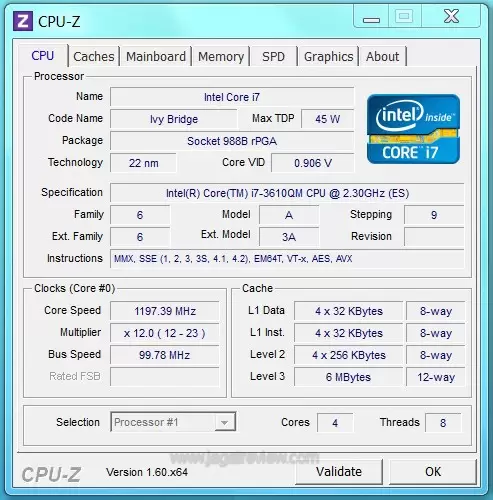
Processor Intel Core i7 2670M Sandy Bridge Intel Core i7 3610M Ivy Bridge Intel Core i7 3610M Ivy Bridge
2.2GHz up to 3.1GHz 6MB L3 2.3GHz up to 3.1GHz 6MB L3 2.3GHz up to 3.1GHz 6MB L3
Memory DDR3 SODIMM 4GB 16GB DDR3 SODIMM 6GB DDR3 SODIMM
Storage 500GB SATA hard disk Mini SSD 60GB x 2 Raid-0 750GB SATA hard disk
Graphics intel GMA 3000 + NVIDIA GT630M intel GMA 4000 + NVIDIA GTX670M intel GMA 4000 + NVIDIA GTX560M
Screen 14 "1366 × 768 15 "1920 × 1080 15 "1920 × 1080
OS Windows 7 Home Premium 64bit Windows 7 Ultimate 64bit Windows 7 Professional 64bit
Only in a relatively short time, we will present articles Ivy Bridge in the second test is for your notebook. However, you have to remember, the value obtained in the first notebook is not a pure benchmark of Intel Ivy Bridge, given the specifications attached to the notebook of this monster is beyond reasonableness that you can get on the market. You can make the notebook as a benchmark. Specification, which carried by a second notebook is still relatively high, but there's still within the limits of reasonableness.
For the beginning of the article, we will only present the performance of the processor and compares it with Intelcore i7 processors Sandy Bridge. Later, we will invite you to see the graphics performance of Intel HD4000 and NVIDIA GeForce GTX670 in a separate article. Enjoy and stay tuned continuation of the article Intel Ivy Bridge for notebook class!

Testing
Sysmark 2007
In tests using Sysmark 2007, this benchmark will run applications as follows.
Adobe ® After Effects ® 7
Adobe ® Illustrator ® CS2
Adobe ® Photoshop ® CS2
Autodesk ® 3ds Max ® 8
Macromedia ® Flash 8
Microsoft ® Excel 2003
Microsoft ® Outlook 2003
Microsoft ® PowerPoint 2003
Microsoft ® Word 2003
Microsoft ® Project 2003
Microsoft ® Windows Media ™ Encoder 9 series
Sony ® Vegas 7
SketchUp 5
WinZip ® 10.0
Sysmark 2007 in turn will run the application automatically, run a variety of jobs within the scope of work and usefulness. At the end of the test, you will be presented with a variety of figures that will show the performance of a notebook or desktop system. Test results are presented in the form of scores. The higher the resulting score, the better.


Based on the above table, it can be seen that the Intel Core i7 3610M Ivy Bridge with a hard disk can outperform an Intel Core i7 2670M Sandy Bridge with a hard disk. There is a difference of about 10 percent. However, a different story when you find an Intel Core i7 3610M Ivy Bridge with SSD. KKinerjanya can be increased by more than 30 percent! Difference between the value of Intel Core i7 3610M notebook Ivy Bridge over the posted due to storage and storage applications like high performance.
MediaShow Expresso 6
MediaShow Espresso 6.0 is the latest version of the popular video transcoding applications. This application is able to convert one video format into another video format (video format such as Blackberry, Apple iPhone, etc.). One of the advantages of these applications is support for the features of AMD (ATI) Stream, NVIDIA CUDA, even in the most recent version of this application supports the Intel Quick Sync. Test results are presented in units of time. The less time it takes, the better.

Wow? Words that were spoken when we see the time required for transcoding process that was on the notebook screen. Apparently, Ivy Bridge processors can do this transcoding job much faster than its predecessor. For a file of 150 MB with full HD 1080P resolution, an Intel Core i7 processor 3610M Ivy Bridge only takes 4-5 seconds by using QuickSync for encoding into a file with a resolution of 720P.
Other stories for the transcoding of the same file. The time needed to convert 1080P to 320P movie file will take approximately 25-24 seconds. By using the CPU power with QuickSync, differences in the time required is not too far away.
Adobe Photoshop CS6
Photoshop CS6 is an image editing application that is so popular and widely used computer users. Experiments were done using Photoshop action, which is "Photo Merge" and the application of several filters in the three images with the JPEG format. Test results are presented in units of time. The less time it takes, the better.

In tests using Adobe Photoshop CS6, the time required for image processing, using the Intel Core i7 3610M Ivy Bridge, to be very brief. The difference is not too far in a system that uses a hard disk with SSD. However, you can imagine when the file to be processed into a unit of Gigabyte. Increased processor performance is far enough from its predecessor. When a Sandy Bridge processor takes 6 minutes, Intel Ivy Bridge only takes in the range of 1 minute 24 seconds.
Cinebench 11.5
Cinebench is a test application to measure the performance of the hardware to do the rendering of a 3D scene. Test results are presented in the form of scores. The higher the resulting score, the better.

Score obtained in the benchmark shows that the CPU performance increased by approximately 20 percent faster than its predecessor. Storage installed almost does not affect this benchmark, given the values obtained are not too far adrift different.
Excel 2010 Montecarlo
You would be familiar with Microsoft's spreadsheet application is made. We tested the performance of the processor in the running "Monte Carlo Simulation Table" in this application. Test results are presented in units of time. The less time it takes, the better.

If you notice, in Montecarlo on benchmark tests using Microsoft Office Excel 2010 application, the obtained value of the Intel Core i7 2670M Sandy Bridge with Intel Core i7 3610M Ivy Bridge with hard disk storage systems have differences that are not far adrift, it is still superior to the system Sandy Bridge processors. On systems with Intel Core i7 + SSD 3610M Ivy Bridge, the value obtained increased by 1 point. This is due to the Office applications are very pleased with the fast storage like SSD.

Conclusion
By looking at the above test results, it looks like Intel has met its promise to deliver a faster processor than the previous series. The resulting performance improvement ranging from 10 to 20 percent. Performance improvements are felt in the video transcoding process, with the Intel QuickSync. This process can be done very quickly so you do not have to waste time transcoding of great resolution to the resolution of the gadget or smartphone. QuickSync is already embedded Intel since the Intel Sandy Bridge, but its performance is much improved diprosesor Intel Ivy Bridge series.
When we start comparing test Ivy Bridge in the notebook processor with one another, we find that the performance of mobile-class processors currently suspended due to storage problems. Hard disks are much attached to the notebook is now no longer able to provide high data bandwidth so that the performance of the processor can not deliver maximum results. If you find an application that requires very high performance storage, you can not maximize the performance of the installed processor. Difference between the value of the notebook hard disk with SSD storage up to 20 percent adrift.

Tidak ada komentar:
Posting Komentar